
DeepL Translate
DeepL SEBooks & Reference
4.72.94K Reviews
- Version
- 26.34
- Installs
- 10.00M
- Age Rating
- Everyone
Screenshots
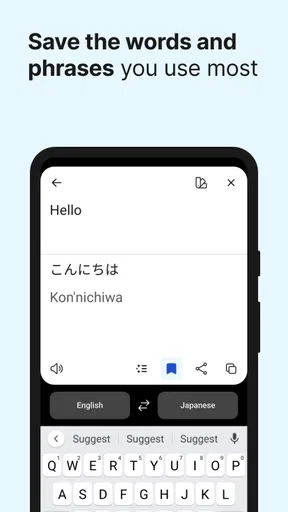
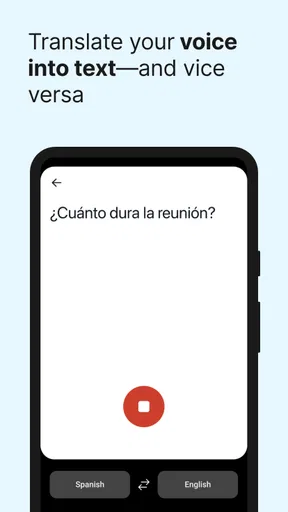
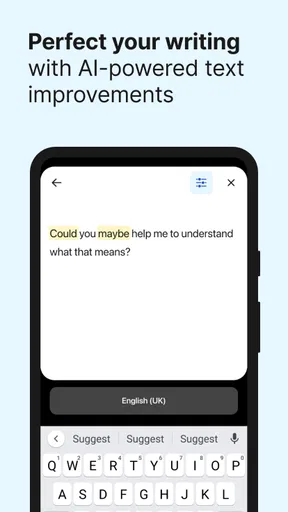
Our Review of DeepL Translate
 Analysis by Appyee
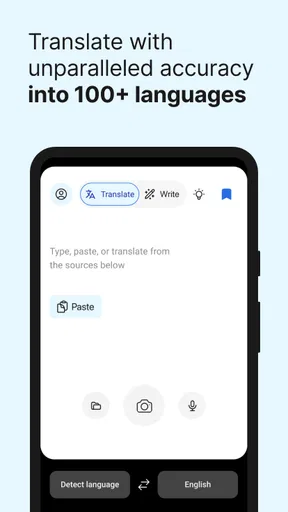
When I need a translation that sounds less mechanical than a quick word swap, DeepL Translate is usually one of the first apps I reach for. It belongs to the Books & Reference category, comes from DeepL SE, and focuses on a simple but important capability: turning text into natural-sounding language across more than 100 languages. That breadth matters, but the real reason I keep it around is the way it tries to preserve meaning, tone, and context instead of treating every sentence as a disconnected collection of words.
I reviewed it as an everyday mobile tool rather than as a specialist language platform. That means looking at the moments when a translation has to be useful immediately: reading a message, checking a phrase before sending it, understanding a short passage, or getting through information written in a language I do not speak. My overall impression is positive. It is free to install, rated for Everyone, and available on devices running Android 8.0 or later. Its average rating is 4.7 from around 425 thousand ratings, which fits my experience of an app that is easy to understand even when the subject being translated is complicated.
Why context is the capability that matters most
The strongest part of this app is not simply the number of languages it covers. It is the attempt to translate a complete thought rather than replacing each word with its most obvious dictionary equivalent. That distinction becomes noticeable with ordinary sentences containing a polite request, an implied subject, a time reference, or a phrase that could have several meanings.
For example, when I translate a short message for travel or work, I am rarely asking only, “What does this word mean?” I want to know how the whole sentence would sound to another person. A literal result can be technically recognizable while still feeling awkward or too direct. DeepL Translate is more useful in that situation because it treats the surrounding wording as part of the problem. The result is not automatically perfect, but it is often a better starting point than a rigid word-for-word rendering.
This makes the app particularly valuable for context-aware translation. I would not use that phrase to suggest that every result should be accepted without checking. Languages contain regional habits, humor, formality levels, and cultural references that an automated translator can miss. Still, the effort to preserve the sentence’s intention changes how much editing I need to do afterward.
The difference is easiest to see with writing that sits between casual and formal. A note to a hotel, a question to a seller, or a short email to someone I have never met needs to be clear without sounding abrupt. I can enter the original wording, inspect the proposed translation, and then adjust the source sentence if the tone is not right. That editing loop is more useful than expecting the first result to be final.
What the language coverage means in real use
Support for over 100 languages gives the app a wide reach, but language count alone should not decide whether it is right for you. The important question is how often you move between languages and how demanding your text is. For a traveler checking signs or messages, broad coverage can make the app a practical first stop. For someone studying one language deeply, the value comes more from comparing phrasing and noticing how a sentence changes than from having access to every available option.
I also find the large language range useful when a conversation involves more than two people. A family trip, an international group chat, or a small project can quickly move between several languages. Keeping one translation tool available is less distracting than searching for a separate solution each time. The app does not remove the need for human judgment, but it reduces the friction of getting a readable draft.
There is a trade-off here. A broad list of supported languages does not mean that every language pair will feel equally polished in every subject. Common everyday sentences are the safest test. Technical instructions, legal wording, medical information, and local expressions deserve extra care because a fluent-looking translation can still be wrong in a meaningful way.
How I use it in practice
The basic workflow is refreshingly direct. I open the app, choose the source and target languages, enter text, and read the result. That simplicity is important on a phone, where a translation tool competes with messages, maps, email, and a browser. I do not want to build a project before understanding one sentence.
My preferred method is to translate in small sections rather than pasting a huge passage all at once. A short paragraph gives enough context for the wording to make sense while keeping mistakes easier to spot. If the output sounds strangely formal or changes the intended emphasis, I split the sentence, simplify the original, and compare the new result. This is one of the most useful habits with any AI translator, and it works especially well here because the app is quick enough for repeated checks.
For a message I plan to send, I use a two-step check. First, I translate my draft into the other language. Then I mentally translate the result back into my own language or ask whether the tone still matches what I intended. This does not prove accuracy, but it catches common problems such as accidental commands, missing negatives, or wording that sounds much stronger than the original.
A less obvious use is polishing text that I already understand. If I have written a sentence in a second language and it feels unnatural, I can compare it with a translation of the same idea from my native language. That gives me a possible alternative structure without forcing me to study a long grammar explanation. For learners, this can reveal patterns in word order and politeness that a dictionary entry would not show.
Short text is where the app feels most comfortable
The app is at its best when I need a fast answer from a manageable amount of text. A restaurant message, a delivery update, a short paragraph from an article, or a reply to a customer can be handled without much ceremony. The shorter the task, the easier it is for me to review the result and decide whether it captures the original meaning.
Longer documents require a different attitude. Even a smooth translation can hide a small omission or interpret an ambiguous phrase incorrectly. I would use DeepL Translate to understand the general meaning of a longer passage, then verify important details against the original. For work that will be published, submitted, or used as an official record, I would treat the output as a draft rather than a finished translation.
That distinction also answers a common question: can this replace a professional translator? In my view, no. It can save time, help me understand unfamiliar text, and produce a strong first draft, but professional translation involves subject knowledge, consistency, cultural judgment, and responsibility for the final wording. The app is a very capable assistant, not a substitute for expert review in high-stakes situations.
A realistic day-to-day scenario
Imagine I am staying in another country and receive a message from an apartment host. The message contains arrival instructions, a request for an estimated time, and a warning about a locked entrance. I paste the text into the app to understand the details. Then I write a reply in my own language, translate it, and inspect whether the arrival time and request are still clear.
If the first draft sounds too casual, I change my original wording before translating again. Instead of trying to force the app to guess my intention, I make the source sentence more precise. “I expect to arrive around six” is safer than an ambiguous phrase about being there “later.” This is a small workflow, but it shows where the app earns its place: it helps me communicate more confidently while leaving me in control of what I actually say.
In that situation, I would still double-check an address, a door code, or a cancellation condition. A translation that is generally understandable may not preserve every practical detail. The app reduces the language barrier; it does not remove the need to read carefully.
Where the experience has limits
The biggest limitation is the confidence a polished sentence can create. Because the output often reads naturally, it is tempting to assume that it is also exact. I have learned to be cautious with idioms, humor, names, measurements, and sentences where a single word changes the meaning. Natural language is not the same as guaranteed accuracy.
Tone is another area where I pay attention. A translation can be grammatically sound while missing the relationship between the speakers. A phrase intended for a close friend may sound stiff, while a message to a business may sound too familiar. I get better results when I describe the situation in the source text or rewrite the sentence with the desired level of politeness already made clear.
Specialized vocabulary creates a similar issue. If I am reading a technical manual, a contract, or health information, I use the app to get orientation, not final authority. Terms can have narrow meanings within a profession, and an apparently sensible alternative may not be the accepted one. In those cases, a subject-specific glossary or human expert is the better option.
There is also a practical cost structure to understand. The app itself is free, while in-app purchases range from $10.49 to $384.00 per item. That means casual users can begin without paying, but anyone considering paid options should examine what level of use they actually need before committing. For occasional travel or brief messages, the free starting point may be enough. Heavy users should compare the available purchase terms with their workflow rather than assuming that every useful function is included at no cost.
I would also skip this app if my main goal were a full language course. It can help me notice wording and compare translations, but translation and language instruction are different activities. Someone who needs structured lessons, pronunciation practice, progress tracking, or a complete grammar path may be happier with a dedicated learning app. Likewise, a person who only needs a single word now and then may find a dictionary faster and more focused.
How it compares with familiar alternatives
Compared with a basic dictionary, DeepL Translate is better for complete sentences and connected ideas. A dictionary gives me control over definitions and examples, which is valuable when I want to study one word closely. The translator is more convenient when I need to understand a message or create a readable reply without assembling the sentence myself.
Compared with a general-purpose translation service, I see the main difference in how much attention is given to phrasing. I would still test both tools when a sentence is important, especially if the wording is ambiguous. One service may choose a more literal option while another produces a smoother one. That comparison can reveal where the original sentence needs clarification.
Compared with a professional translator, the app wins on speed, availability, and cost for ordinary tasks. The professional wins when nuance, accountability, and consistent terminology matter more than immediate convenience. I would use DeepL Translate to prepare questions for a translator, understand a first draft, or handle low-risk communication, but not to make a serious document trustworthy by itself.
One practical tip is to keep the original text beside the translation whenever the information affects money, travel arrangements, safety, or deadlines. Reading both versions takes longer than accepting the result, but it is the best way to catch a missing qualifier or an unexpectedly strong instruction.
Who gets the most from it
I think the best audience is people who regularly cross language boundaries but do not need a formal translation department. Travelers, international students, remote workers, multilingual families, online shoppers, and anyone communicating with overseas customers can all benefit. The app is especially helpful for people who know enough of another language to recognize when a sentence feels odd, because they can use the result as a draft and refine it intelligently.
It is also a good fit for readers who encounter foreign-language material every day. Instead of abandoning an article, product instruction, or message because of one difficult passage, I can use the app to get the general meaning and return to the original with more context. That makes it a useful bridge, particularly when I do not need a literary-quality translation of every line.
Beginners can use it too, but they should avoid treating it as an unquestionable answer key. A learner who copies every result without examining the source may absorb expressions that are technically correct but unsuitable for the situation. I get more educational value by comparing the original and translated sentence, identifying the changed structure, and checking why the result sounds natural.
People who should look elsewhere include those seeking offline-first travel support, a complete study curriculum, or guaranteed precision for legal, medical, financial, or safety-critical writing. I would also recommend a human review when the text represents a company publicly or carries consequences for another person. The app can speed up preparation, but responsibility for the final message remains with me.
My final view after using it
DeepL Translate succeeds because it focuses on the part of translation that matters most in everyday communication: making the whole thought understandable and reasonably natural. Its support for more than 100 languages gives it broad usefulness, while the free entry point makes it easy to keep available for occasional needs. With over 10 million installs and a 4.7 average, it has clearly become a familiar choice for many mobile users, and I can see why.
My recommendation comes with one rule: use it as an intelligent first draft, not as permission to stop thinking. For a quick message, a travel question, a short article, or a multilingual conversation, it can save time and reduce hesitation. For high-stakes documents or delicate cultural situations, I would combine it with the original text, a reliable reference, or a human reviewer.
The current version is 26.34, and the app supports Android 8.0 and newer. Those details make it accessible to a wide range of Android phones, while the Everyone age rating suits its general-purpose role. If you want a translation tool that feels more attentive to sentence meaning than a simple word lookup, I think it is worth trying. Its best quality is not that it translates everything for me, but that it gives me a clearer, more usable starting point.
Verdict
Strengths of DeepL Translate
- Highly accurate translations for many common language pairs.
- Clean, intuitive interface that is easy for beginners to navigate.
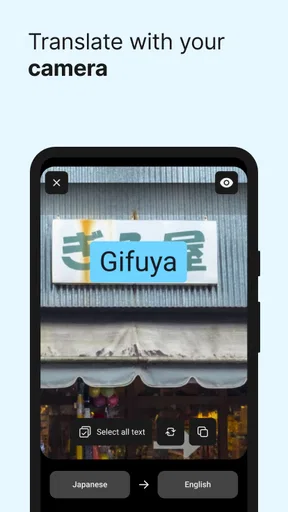
- Supports text, document, and image translation in one app.
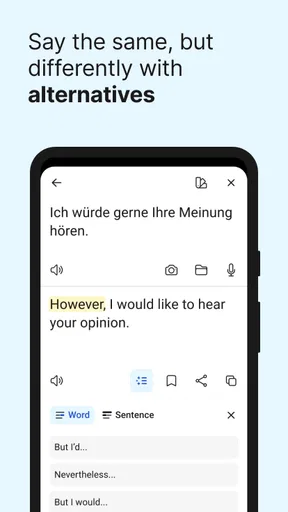
- Alternative wording suggestions help refine translated sentences.
- Useful tone controls are available for supported languages and plans.
Limitations of DeepL Translate
- Some advanced features require a paid DeepL Pro subscription.
- Language support is smaller than that of several competing translators.
- Image translation may struggle with blurry text or complex layouts.
- Offline translation options are limited compared with dedicated translation apps.
- Usage limits can apply when translating large amounts of text or documents.
Similar Picks in This Category
View All
Google Play Books & Audiobooks
Google LLC4.7

네이버 - NAVER
NAVER Corp.3.5

Wattpad - Read & Write Stories
Wattpad.com3.7

King James Bible - Verse+Audio
Ozion4.8

Bible Offline-KJV Holy Bible
Bíblia Offline4.9

Amazon Kindle: Reading App
Amazon Mobile LLC4.8
Frequently Asked Questions
What is DeepL Translate and what can it do?
DeepL Translate is a translation app for Android and iOS that supports text translation between multiple languages. After testing it, I found it especially useful for translating messages, documents, menus, and short passages quickly. It also offers alternative wording in some cases, which can help users choose a more natural expression instead of accepting the first translation automatically provided.
Is DeepL Translate free to download and use?
Yes, DeepL Translate can generally be downloaded and used without paying, although the free version has usage limits and fewer features than the paid plans. During normal use, basic text translation is straightforward, but frequent users may encounter restrictions on character counts, document translation, or advanced tools. Checking the current App Store or Google Play listing is recommended because plans can change.
Does DeepL Translate work offline?
DeepL Translate is primarily designed as an online translation service, so an internet connection is normally required to receive its full-quality results. In my experience, this makes it dependable at home, at work, or while traveling with mobile data, but less convenient in areas with poor coverage. Users who need completely offline translation should consider whether another app better matches that requirement.
Which languages and translation features does DeepL Translate support?
DeepL supports a substantial selection of widely used languages, although its language list may differ from that of larger general-purpose translation services. The app can translate typed or pasted text and may also provide features such as voice input, camera-based text recognition, copying results, and alternative phrasing, depending on the device, language pair, and subscription. Availability should be checked before downloading.
Is DeepL Translate accurate enough for professional or important translations?
DeepL Translate often produces fluent and natural-sounding results, particularly for common European language pairs and everyday writing. However, it should not be treated as a replacement for a qualified translator when legal, medical, financial, academic, or highly sensitive content is involved. I recommend reviewing names, technical terms, tone, and context carefully, since even strong machine translations can occasionally misunderstand the intended meaning.
